Google Just Made Gemini AI Work on iPhone. Here’s What Changed
Chrome on iPhone finally caught up to Android and desktop. Google’s built-in Gemini AI just landed on iOS devices after months of waiting.
The update brings AI-powered page summaries and interactive learning tools directly into your browser. No app switching required. But as with all AI assistants, it hallucinates sometimes and shouldn’t handle critical tasks.
How to Find Gemini in Chrome
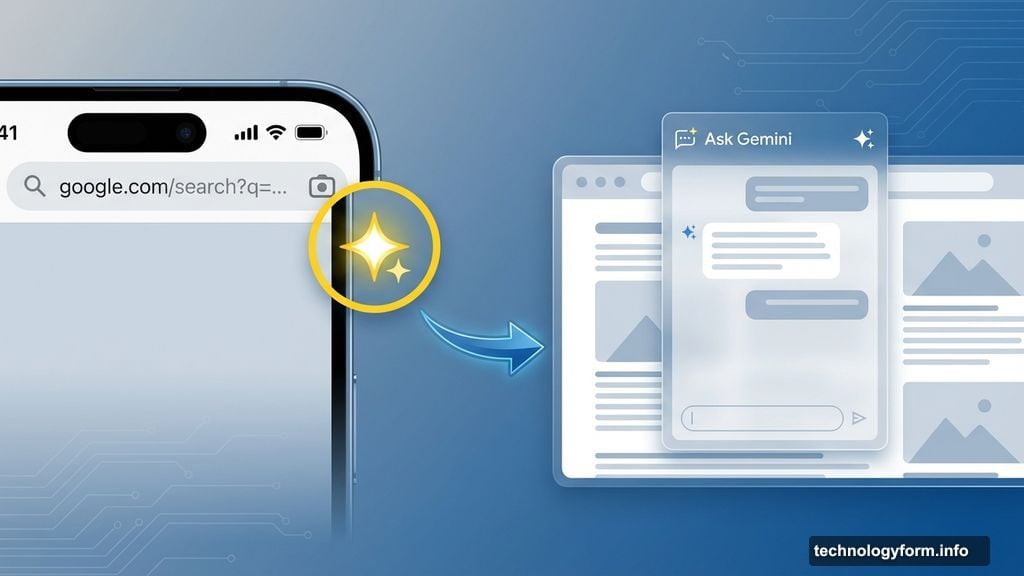
Look for the spark icon. It replaced the Google Lens camera spot on the left side of your address bar.
Tap it and you’ll see two options: Lens and “Ask Gemini.” The new Ask Gemini feature lets you chat about the current webpage or pivot to any topic you want.
Plus, it suggests helpful actions right in the chat box. Things like “Summarize page” or “Create FAQ about this topic” appear automatically based on what you’re reading.
What Gemini Actually Does
The AI analyzes whatever page you’re viewing. Then it offers several practical features.
Page summaries extract key points from long articles. So you can grasp the main ideas without reading everything. Helpful for research or catching up on news quickly.
FAQ generation pulls questions and answers from the current page and similar sites. Great when you’re learning something new and want structured information.
Knowledge testing helps you practice what you learned. Ask Gemini to quiz you on a topic and it creates questions based on the content.
Recipe modifications adjust cooking instructions for dietary needs. Vegetarian? Gluten-free? Tell Gemini and it adapts recipes accordingly.
Product comparisons analyze multiple options based on your priorities. Shopping for headphones? Gemini can weigh features against your preferences.
How the Interface Works
Your chat floats over the webpage. The page slides to the background but stays visible underneath.
Responses appear in a chat window that overlays your browsing. You can start fresh conversations from the top right corner. And there’s a Liquid Glass overflow menu for additional options.
However, the chat doesn’t integrate with your browsing history or save conversations between sessions. Each interaction starts clean.
Important Limitations to Know
This feature only works under specific conditions. First, you need to be in the United States with Chrome’s language set to English.
You must sign into Chrome. Incognito mode blocks Gemini completely. And Google restricts it to users 18 and older.
Moreover, the rollout happens gradually. Even if you meet all requirements, Gemini might not appear on your device immediately. Google’s staggering the release over several weeks.
The AI Accuracy Problem
Gemini makes mistakes. Like all large language models, it sometimes generates false information that sounds convincing.
That means you shouldn’t trust it for medical advice, legal questions, or financial decisions. Cross-check important information against authoritative sources.
For casual learning, recipe tweaks, or getting the gist of articles? It works well enough. Just maintain healthy skepticism about its responses.
Desktop and Android Got This First
iPhone users waited months for this feature. Google launched Gemini in Chrome on desktop and Android earlier in 2025.
Why the delay? Apple’s iOS restrictions make browser modifications more complex than on other platforms. Google needed extra time to navigate those requirements.
Still, the feature works identically across platforms now. Android users don’t get exclusive capabilities anymore.
What This Means for Browsing
AI assistants in browsers are becoming standard. Microsoft added Copilot to Edge. Brave shipped Leo. Chrome now embeds Gemini across all major platforms.
This changes how people interact with web content. Instead of just reading, users can interrogate pages and extract customized insights.
But it also raises concerns about over-reliance on AI summaries. Reading full articles develops deeper understanding than skimming AI-generated takeaways.
The tools are useful. Just don’t let them replace actual reading and critical thinking.