Figma Just Swallowed an AI Powerhouse. Creative Workflows Will Never Be the Same
Figma bought Weavy, and this changes everything about AI-powered content creation.
The design platform just acquired the AI tool that lets you mix multiple AI models in one place. Plus, it brings professional editing tools into the same canvas. No more jumping between apps. No more workflow chaos.
So what does this mean for designers, video editors, and creative professionals? Let’s break down why this acquisition matters and what you can actually do with it.
One Canvas, Every AI Model You Need
Weavy solves a problem most creative professionals face daily. You want to use the best AI model for each specific task. But switching between different platforms kills productivity.
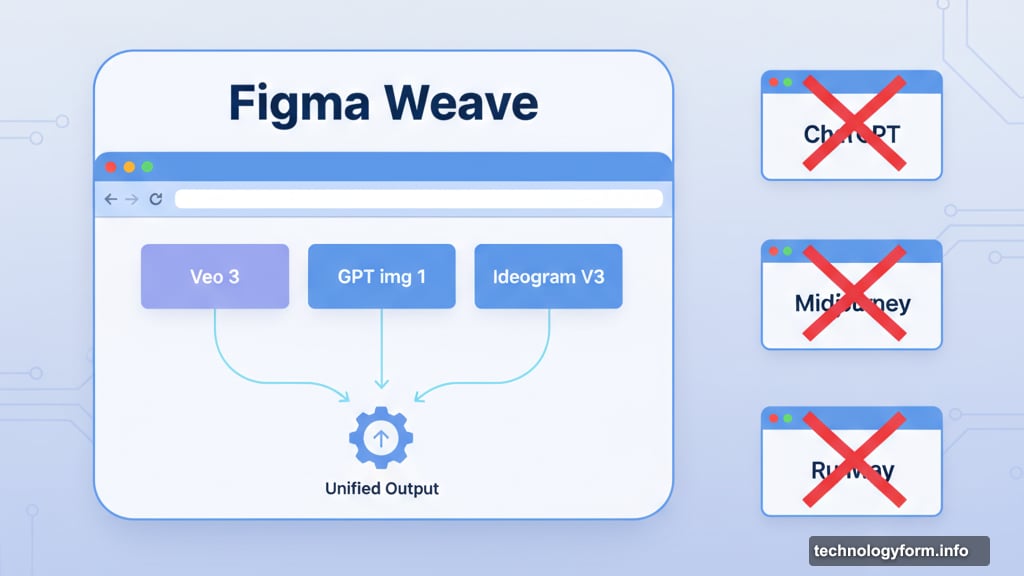
Here’s what made Weavy special. It combines models like Veo 3, GPT img 1, and Ideogram V3 in a single browser-based interface. Each model excels at different things. So smart users pick the right tool for each job.
Now Figma owns that technology. They’re calling it Figma Weave.
Moreover, this acquisition signals Figma’s expansion beyond traditional design tools. The company wants to handle image creation, video editing, animation, motion design, and VFX. All within one platform.
Node-Based Control Changes the Game
Most AI content tools give you limited control. You type a prompt. The AI generates something. You either accept it or try again.
Weavy works differently. It uses a node-based approach that gives creators precise control over AI outputs.
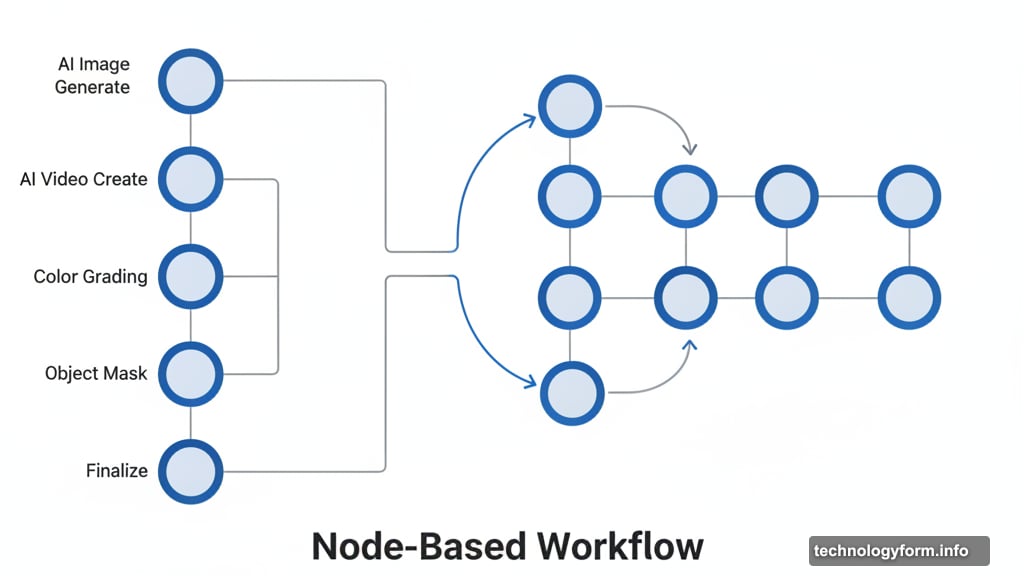
Here’s how it works. You create different nodes for various tasks. One node generates an AI image. Another creates video content. A third applies color grading. Then you connect these nodes together.
This method lets you branch, remix, and refine AI outputs. You’re not stuck with whatever the AI first generates. Instead, you can iterate and improve step by step.
Think of it like visual programming for creative work. Each node represents a specific operation. Connect them in different ways to achieve exactly what you want.
Professional Editing Meets AI Generation
The real power comes from combining AI generation with professional editing tools. You can generate an AI video and immediately grade the footage. Or create an AI image and mask specific objects without leaving the platform.
Traditional workflows require multiple apps. Generate content in one tool. Export. Import into an editing suite. Make adjustments. Export again. It’s tedious and time-consuming.
Figma Weave eliminates those steps. Everything happens in one place. Generate, edit, refine, and finalize without switching contexts.
Plus, this integration matters for collaboration. Figma built its reputation on real-time collaborative design. Now those same collaborative features will extend to AI-powered content creation.
Teams can work together on AI-generated videos. They can branch different creative directions. Then compare results and choose the best approach.
Why Weavy Chose Figma
Weavy explained their decision in a LinkedIn post. Both companies share similar foundations. They believe in craft, collaboration, and system building.
More importantly, both companies focus on amplifying human creativity rather than replacing it. AI serves as a tool that enhances what creators can do. It doesn’t eliminate the need for creative judgment and skill.
That philosophy matters. Too many AI tools feel like black boxes. You get results, but you don’t understand or control the process. Weavy’s node-based approach gives creators visibility and control.
Figma echoed this view. They stated the acquisition will “unlock new possibilities” as they build a platform where AI enhances creativity. The goal is helping users push the limits of their craft.
Figma’s 2025 Expansion Blitz
This acquisition fits into Figma’s broader 2025 strategy. The company introduced multiple new tools at its Config event earlier this year. Figma Make and Figma Draw expanded the platform’s capabilities.
Now Figma Weave adds AI-powered content generation and professional editing. The pattern is clear. Figma wants to become the complete creative platform for modern professionals.
Video editing used to require dedicated apps like Adobe Premiere or DaVinci Resolve. Motion graphics meant After Effects. Animation needed specialized tools. VFX work required complex software suites.
Figma is betting they can consolidate these workflows. One platform. One collaborative space. One subscription.
It’s ambitious. But Figma has proven they can execute on big ideas. Their design tools already dominate much of the industry. So extending that dominance to video, animation, and AI-generated content seems plausible.
What This Means for Adobe
Adobe should be nervous. Figma already challenged their design tool monopoly. Now Figma is coming for their creative suite.
Adobe offers AI features across their products. But those tools remain siloed. Photoshop has AI. Premiere has different AI tools. After Effects has its own features. Moving between them isn’t seamless.
Figma Weave promises a unified experience. All AI models accessible from one canvas. All editing tools integrated. Plus, Figma’s collaborative features that Adobe still struggles to match.
Moreover, Figma operates in the browser. No massive downloads. No installation headaches. No compatibility issues. Just open a URL and start creating.
That accessibility matters. Smaller teams and independent creators can access professional-grade tools without expensive hardware or complex software management.
The Craft vs Automation Balance
Both companies emphasized their commitment to craft and human creativity. That’s smart positioning in an era where AI threatens to commoditize creative work.
The message is clear. These tools don’t replace designers and editors. Instead, they handle tedious tasks and enable faster iteration. Creators spend more time on high-level decisions and less time on repetitive operations.
Here’s an example. You need to create ten variations of a marketing video. Traditionally, that means manual editing for each version. With Figma Weave, you can set up a node system that generates variations automatically. Then you review and refine the options that work best.
You’re still making creative decisions. But AI accelerates the execution. That’s the promised balance between automation and craft.
Try Figma Weave Now
You can start using Figma Weave today. The platform is live and accessible through Figma’s website.
Early adoption makes sense for creative professionals. Learn the node-based workflow now. Experiment with combining different AI models. Discover which approaches work best for your projects.
The creative tools landscape is shifting fast. Figma is betting big on unified, AI-enhanced workflows. Whether this gamble pays off depends on execution. But the vision is compelling.
One platform. Multiple AI models. Professional editing. Real-time collaboration. If Figma delivers on that promise, creative workflows will change dramatically in the next few years.